
I've had a go at building a showreel aimed at applying for a Flash/2D animation job.
Flash ~ 2008 Showreel from Frank G on Vimeo.
Tuesday, September 2, 2008

Monday, September 1, 2008
Shudder tests - using a 'graph editor'
This time I converted the shudder frames into a motion tween, as I am working in Flash. I selected the motion tween and opened the "Ease In / Ease Out" tool and created a shudder using the chart. This is animating via graphs and mathematics, rather than "by eye".
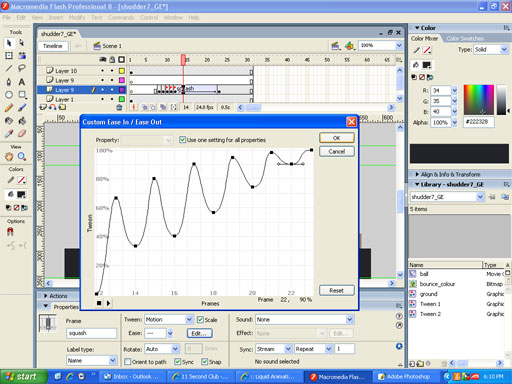
shudder ~ using Flash's 'graph editor' from Frank G on Vimeo.
---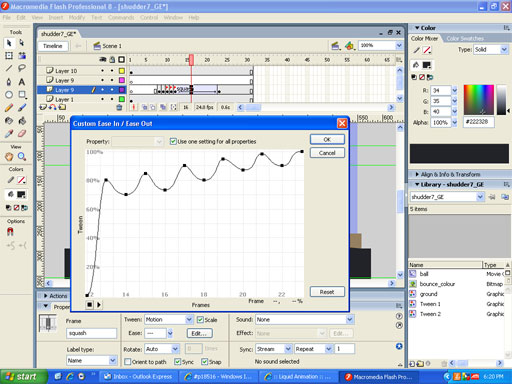 -----------------------------------------------------
shudder ~ graph editor ~ tiny shakes from Frank G on Vimeo.
shudder ~ using Flash's 'graph editor' from Frank G on Vimeo.
---
-----------------------------------------------------shudder ~ graph editor ~ tiny shakes from Frank G on Vimeo.
Shudder Test
As part of an animation "workout', we've been told all animators should be able to animate a shudder. I haven't got this one correct... yet. It is a heavy object landing shudder. Most recent attempts are at the top of the pile.
shudder ~ maintain object volume from Frank G on Vimeo.
shudder experiment ~ overshoot style from Frank G on Vimeo.
shudder - WIP from Frank G on Vimeo.
shudder_solidball from Frank G on Vimeo.
shudder from Frank G on Vimeo.
shudder ~ maintain object volume from Frank G on Vimeo.
shudder experiment ~ overshoot style from Frank G on Vimeo.
shudder - WIP from Frank G on Vimeo.
shudder_solidball from Frank G on Vimeo.
shudder from Frank G on Vimeo.
Sunday, August 31, 2008
Animation workout ~ heavy jump ~ WIP
A work in progress. Allegedly every animator should know how to animate a shudder and know where to apply it. In this workout, the shudder is meant to imply weight.
Heavy Jump ~ timing/spacing ~ WIP from Frank G on Vimeo.
Heavy Jump ~ timing/spacing ~ WIP from Frank G on Vimeo.
Saturday, August 30, 2008
Tuesday, August 19, 2008
Animating in 3D using a 2D Flash animation as a guide
I'm learning a lot (the hard way) about animating in 3D compared to animating in 2D.
Don't let the computer be the animator! It's a tough struggle and teaching me about persistence.
Here is the 2D Flash animation I'm working with and a 3D 'blocking pass' that I'm just starting to break down. Keeping the arcs and spacing in the body turns are a real challenge.
My Son has a Gift - 2D from Frank G on Vimeo.
My Son has a Gift - 3D blocking pass from Frank G on Vimeo.
Don't let the computer be the animator! It's a tough struggle and teaching me about persistence.
Here is the 2D Flash animation I'm working with and a 3D 'blocking pass' that I'm just starting to break down. Keeping the arcs and spacing in the body turns are a real challenge.
My Son has a Gift - 2D from Frank G on Vimeo.
My Son has a Gift - 3D blocking pass from Frank G on Vimeo.
Friday, July 18, 2008
My Sun has a gift
The 11SecondClub has a monthly competition. The dialogue is from the July comp. I tried to take a simple character design and focus on the animation performance. This was a test run with just the main character's head. The colour idea came from the Adobe "Kuler" web site. When I played the animation, it made me think of a planet talking about his sun. Inspired by Chuck Jones.
Solar Pow Wow from Frank G on Vimeo.
Solar Pow Wow from Frank G on Vimeo.
Tuesday, July 15, 2008
Home made peg bar - animation and scanning
 We have a hole punch at school that matches the pegs on our light boxes, so I go to school and punch 500 sheets of paper (recycled)at a time.
Last summer holidays I ran out of punched holy animating paper, so I made my own peg bar out of a plastic ruler and some sawn off paint brushes, and taped it onto the light box disc. The home made pegs matched a standard 2-hole paper punch you'd find in any office. The result isn't as stable as the 3-peg hole punch that matches the animation disc pegs, but it still worked and kept me "moving forward".
The benefit of making the peg bar from a thin plastic ruler was that I could take the peg bar to my scanner and tape it on. So when I scanned my drawings into the computer they stayed 'registered' (in place, held by the pegs). That sped up the scanning and kept the animated movements to the ones I had drawn, not movements due to the drawings being out of alignment.
At school we make registration bars for the scanners out of thin plastic rulers. We punch through some plastic with the animation 3-peg punch. Collect the punched out plastic bits. Then glue them in place on the thin ruler. The punched out bits are only a few millimetres thick but thick enough to register the drawings being scanned in alignment.
Subscribe to:
Posts (Atom)